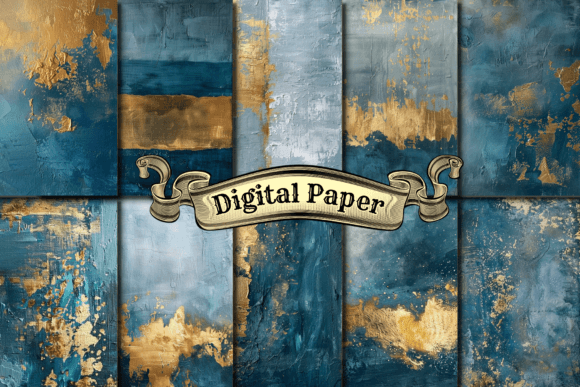
Blue Gold Foil Digital Paper: Elevating Your Designs Without the Compromise
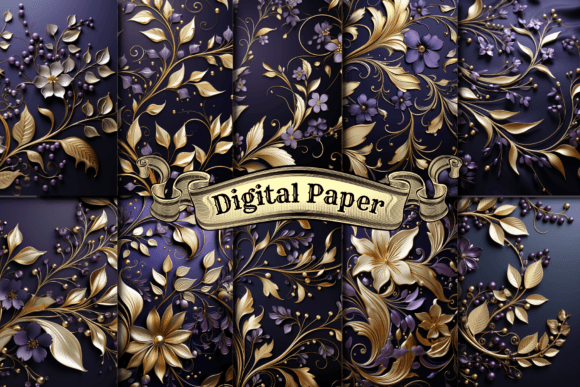
When you are looking to add a touch of luxury and depth to your creative projects, Blue Gold Foil Digital Paper stands out as a versatile asset that bridges the gap between traditional elegance and modern digital utility. It is not merely a background; it is a texture that mimics the shimmer of real foil against a deep, rich blue canvas. For creators ranging from small business owners launching new brands to hobbyists designing custom stationery, this specific pattern set offers a high-impact visual element that can transform flat designs into premium products.
However, simply downloading a file does not guarantee a successful outcome. Many users rush into using digital textures without understanding the technical nuances required to make them look authentic in print or on screen. The difference between a design that looks cheap and one that looks professional often lies in how you handle resolution, color profiles, and application methods. This guide explores the practical realities of working with this specific digital paper set, highlighting common pitfalls and offering straightforward solutions to ensure your final product meets high standards.
Understanding Resolution and Print Quality
One of the most critical factors when selecting digital assets is resolution. You might be tempted to choose a cheaper option with lower pixel counts to save money, but this decision can severely compromise your final output. The Blue Gold Foil Digital Paper set provided here features each pattern measuring 4000 x 4000 pixels. This dimension is substantial and essential for anyone planning to use these files for physical production.
A common mistake occurs when beginners assume that a high-resolution image will automatically scale up perfectly if they stretch it in their software. If you attempt to use a low-resolution version of a similar pattern for large-format printing, such as wall art or banners, the result will be pixelated and blurry. The gold foil effect relies on fine details to catch the light and create the illusion of metallic sheen. When those details break down due to stretching, the "foil" effect disappears, leaving a muddy, unprofessional appearance.
To avoid this, always verify the pixel dimensions before starting a project. With 4000 pixels on each side, these JPG and PNG files are optimized for Print On Demand (POD) services. They provide enough data to produce sharp results on T-shirts, phone cases, and fabric without requiring excessive upscaling. If you need to resize an image, do so by reducing its size rather than enlarging it. Conversely, if you find yourself needing to enlarge a smaller image, you will likely degrade the quality, making the original choice of a 4000x4000 file even more vital.
File Formats Matter: JPG vs. PNG
The set includes both JPG and PNG formats, and choosing the wrong one can lead to unnecessary frustration. A frequent error is using a JPG file when transparency is required. JPGs do not support transparent backgrounds; they fill every corner with a solid color, usually white or black. If you try to layer a JPG over another design element in Silhouette Studio or Cricut Design Space, you will end up with a visible box around your shape that ruins the aesthetic.
In contrast, the PNG versions included in this set preserve transparency. This is non-negotiable for projects like creating vinyl decals, cutting shapes for apparel, or placing graphics over existing images. Always check the file extension before importing it into your design software. If you see a white square surrounding your blue and gold pattern, you have opened the JPG file instead of the PNG. Switching to the correct format ensures clean edges and seamless integration with your other design elements.
Optimizing for Print On Demand and Physical Products
Many entrepreneurs enter the Print On Demand market without fully grasping how digital colors translate to physical materials. The shimmer of the gold foil in a digital file is created through gradients and highlights. However, printing technology varies significantly across different POD providers. A common misunderstanding is assuming that the vibrant blue and bright gold seen on your monitor will appear exactly the same on a printed t-shirt or notebook cover.
Color profiles play a huge role here. Monitors typically use RGB (Red, Green, Blue) color models, while printers use CMYK (Cyan, Magenta, Yellow, Key/Black). While you cannot convert a digital file directly to CMYK without specialized software, being aware of this shift helps manage expectations. To ensure the best results, test print a small sample before ordering bulk items. This step prevents costly mistakes where the blue appears too dark or the gold lacks the necessary pop.
Furthermore, consider the substrate you are printing on. Applying this digital paper to a glossy phone case yields a different result than applying it to matte fabric. The texture of the material interacts with the printed ink. For example, on fabric, the ink may soak slightly, softening the sharpness of the foil lines. On hard surfaces like homeware or notebooks, the colors remain crisp. Understanding these variables allows you to select the right product for the right design, ensuring customer satisfaction and reducing returns.
Creative Applications Beyond Standard Prints
While wall art and apparel are obvious choices, the versatility of Blue Gold Foil Digital Paper extends far beyond these categories. One overlooked opportunity is in branding and social media. Using this texture as a background for company logos or website headers can instantly elevate a brand's perceived value. However, be careful not to let the pattern overpower your text. If the foil effect is too busy, readability suffers.
A better approach is to use the pattern sparingly. Try placing the blue gold texture behind a logo in a way that frames it, or use it as a border for a blog post banner. For educators and freelancers, this pattern works beautifully for creating branded planners, notebooks, and stationery. When designing these items, ensure there is enough negative space so the content remains legible. Do not feel compelled to use the pattern everywhere; strategic placement creates a more sophisticated look than covering every inch of the page.
Evaluating Your Choice Before Buying
Before purchasing any digital asset, take a moment to evaluate the specific needs of your current project. Are you looking for a subtle texture or a bold statement? The Blue Gold Foil Digital Paper set offers ten distinct patterns, which provides variety but also requires selection. A common mistake is downloading the entire pack and then struggling to decide which one fits, leading to analysis paralysis.
Instead, define your goal first. If you are designing a corporate identity, you might prefer a cleaner, more uniform foil pattern. If you are creating party invitations or holiday decorations, a more dynamic, sparkly pattern might be appropriate. Review the previews carefully. Look at how the light reflects off the gold in each image. Does it match the mood you want to convey?
Additionally, check the licensing terms. Some sellers restrict commercial use, meaning you cannot sell products made with their designs. Ensure the license allows for Print On Demand usage if that is your business model. This simple check protects you from potential legal issues down the line. By taking the time to understand the technical specifications, file formats, and licensing requirements, you ensure that your investment in digital paper translates into high-quality, profitable work.
Ultimately, success in digital design comes from preparation and attention to detail. By avoiding the traps of poor resolution, incorrect file formats, and unrealistic color expectations, you can leverage the full potential of this stunning Blue Gold Foil collection. Whether you are crafting a unique piece of wall art or building a comprehensive brand identity, these digital papers offer the foundation for professional results.